Pressure Washing Job Profit & Bookkeeping Tracker (Excel & Google Sheets)
A simple spreadsheet for pressure washing owners who want to know which jobs actually make money — and keep tidy records of money in, money out and business miles. No subscription, no app.
What's inside
- Jobs tab: date, client, job type (house wash, driveway/concrete, deck/fence, roof soft wash, commercial, gutter brightening), amount charged, chemicals + water, labor hours, miles and other costs → labor cost, mileage cost, total cost, profit, margin % and profit per labor hour for every job.
- Income & Expenses log with category dropdowns (sample expense categories: chemicals (SH, surfactant), fuel, equipment purchase, repair/parts, water, labor/helpers, insurance, marketing, vehicle/trailer — edit them in Settings).
- Mileage log: start/end odometer or miles, value at the rate you choose.
- Dashboard: month-by-month income, expenses, net, job count, job revenue and profit, average profit per job, miles and mileage value; yearly totals by category; an income-vs-expenses chart.
- Instructions tab, sample rows to show how it works, 300 rows per log, yellow input cells and locked formula cells.
Real screenshots (sample data)
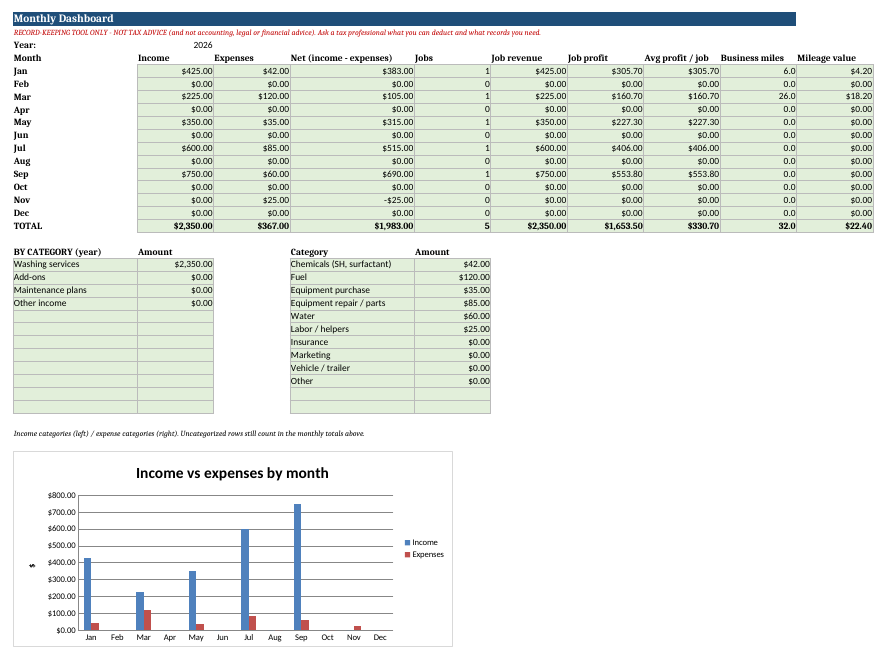
Dashboard: monthly income, expenses, net, jobs, job profit, miles + chart (sample data)

Jobs tab: per-job profit, margin and profit per labor hour (sample data)
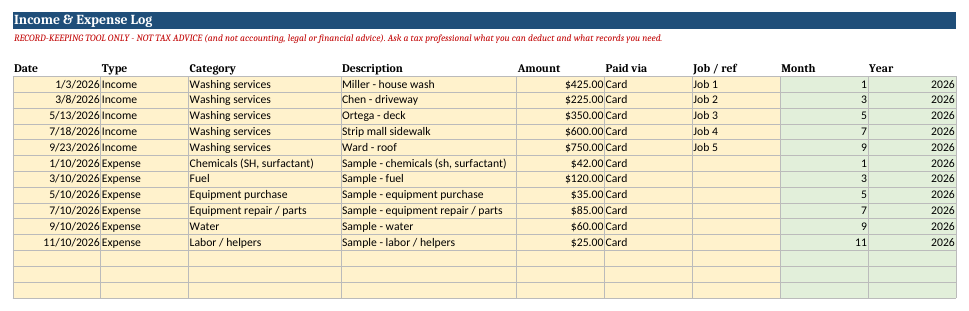
Income & Expenses log with categories (sample data)
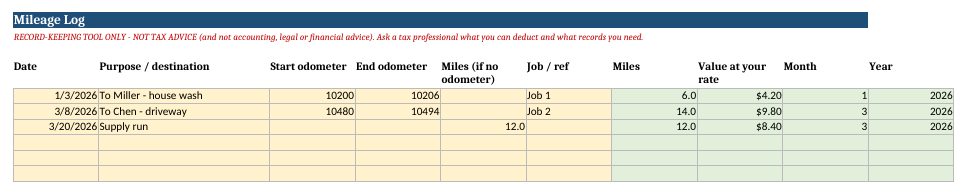
Mileage log (sample data)
What you get
Pressure-Washing-Profit-Bookkeeping-Tracker.xlsx and a 2-page PDF quick-start guide (includes Google Sheets import steps).
$19
Instant download (.xlsx + PDF quick-start guide). Works in Excel, Google Sheets and LibreOffice.
Record-keeping tool only — not tax advice (and not accounting, legal or financial advice). It does not calculate taxes or deductions. Ask a tax professional what you can deduct and which records you must keep.
Opening it in Google Sheets
Google Drive → New → File upload → open the .xlsx → File → Save as Google Sheets. The formulas (SUMIFS, COUNTIFS, MONTH, YEAR, IF) and dropdowns carry over. If the chart doesn't convert cleanly, select Dashboard A4:C16 and Insert → Chart. Sheet protection is an Excel/LibreOffice feature; in Sheets just type only in yellow cells. Excel and LibreOffice open it directly.
Try the math first: free pressure washing job profit calculator. Other trades: cleaning · home bakery · lawn care
Common questions
Does it work in Google Sheets?
Yes. Upload the .xlsx to Google Drive and open it with Google Sheets. Only standard functions are used. In Sheets, type only in the yellow cells.
Do I need Excel?
No. Google Sheets (free) or LibreOffice (free) work too.
How do I get the files?
Right after payment you see download links, and they are emailed to you. Links work for 7 days, so save the files.
Will it tell me the right price for my area?
No. It turns your own costs and target margin into a price. Local rates and demand are up to you. It is an estimating tool, not tax or financial advice.
Is this a subscription?
No. It is a one-time purchase.