Recipe & Batch Costing Sheet (Excel & Google Sheets)
For home bakers and cottage food makers: cost every recipe from your own ingredient prices, then see the cost per unit and a suggested price that includes your labor.
What's inside
- Ingredient cost library (60 rows): package price, package size and unit → cost per unit; optional "where bought / date" column.
- 5 recipe tabs: up to 20 ingredients each from a dropdown, batch yield, waste / spoilage %, packaging per unit, labor minutes × your hourly wage, overhead per batch.
- Results: ingredient cost (before and after waste), total batch cost, cost per unit, suggested price per unit = cost × (1 + markup %), rounded up to $0.25, price per dozen, profit per unit, margin %, batch revenue and profit.
- Price List tab pulls all 5 recipes onto one page. Sample recipes: chocolate chip cookies, vanilla cupcakes, sourdough, brownies (sample prices are illustrative).
Real screenshots (sample data)
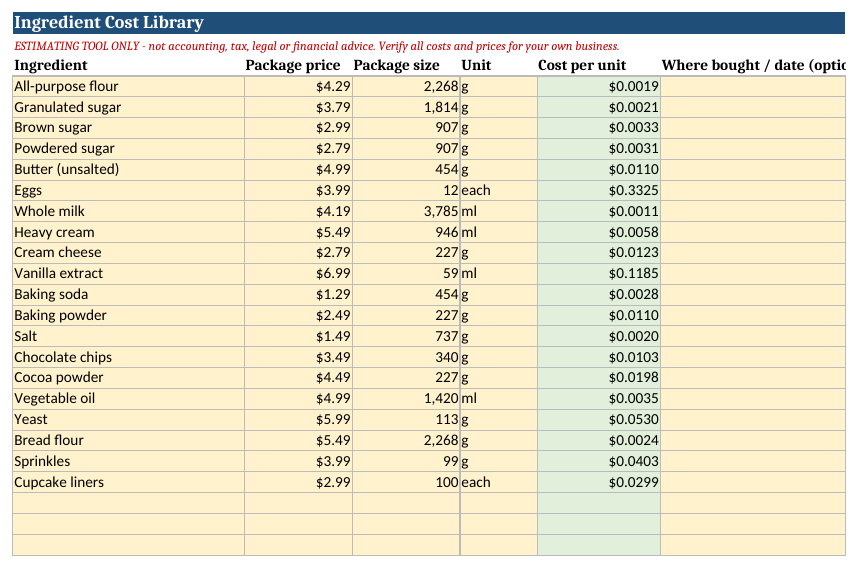
Ingredient cost library (sample prices)
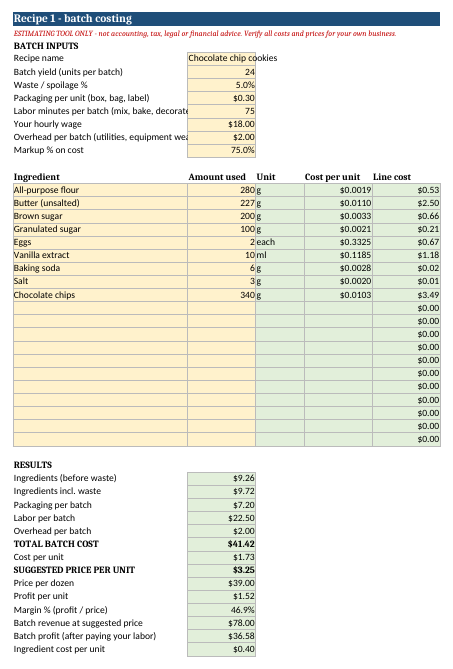
Recipe tab: batch cost, cost per unit, suggested price (sample cookies recipe)
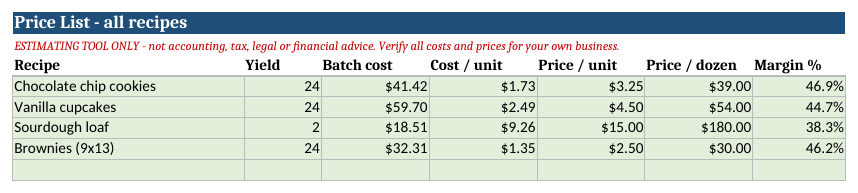
Price List: all recipes on one page (sample data)
What you get
Recipe-Batch-Costing-Sheet.xlsx and a 2-page PDF quick-start guide (includes Google Sheets steps).
$15
Instant download (.xlsx + PDF quick-start guide). Works in Excel, Google Sheets and LibreOffice.
Already own the Home Bakery Pricing Calculator? It also costs a recipe (margin-based, per item / half-dozen / dozen). This sheet adds a bigger ingredient library, waste %, markup-on-cost pricing, 5 recipe tabs and a combined price list. Cottage food rules and sales tax vary by location; this sheet does not compute tax. Pricing tool only — not financial or tax advice.
Baker Bundle — $35
Home Bakery Pricing Calculator ($15) + this Recipe & Batch Costing Sheet ($15) + Home Bakery Profit & Bookkeeping Tracker ($19). Separately $49.
$35
Instant download: 3 spreadsheets + 3 PDF quick-start guides.
Try it free first: cookie & cake pricing calculator · Guides: pricing cookies · cupcake formula
Common questions
Does it work in Google Sheets?
Yes. Upload the .xlsx to Google Drive and open it with Google Sheets. Only standard functions are used. In Sheets, type only in the yellow cells.
Do I need Excel?
No. Google Sheets (free) or LibreOffice (free) work too.
How do I get the files?
Right after payment you see download links, and they are emailed to you. Links work for 7 days, so save the files.
Will it tell me the right price for my area?
No. It turns your own costs and target margin into a price. Local rates and demand are up to you. It is an estimating tool, not tax or financial advice.
Is this a subscription?
No. It is a one-time purchase.